响岩 Phonolite · Windows · 免费Phonolite · Windows · Free

把会议留成文字Every meeting, in writing

中英混说 · 会中字幕与翻译 · 会后纪要 · 全程离线Mixed Chinese & English · Live captions & translation · Notes · Fully offline

实机录屏Real footage

功能Features

会上听得清
会后写得好
Hear every word.
Write it up well.

边说,边出字幕和译文。Captions and translation, as people speak.

每句话在说话停顿处断开,先出字,再出译文:以中文为主的句子译成英文,其余译成中文。结束录音,字幕直接成为文字稿。Each sentence is cut at a natural pause, shown right away, then translated: mostly-Chinese into English, everything else into Chinese. Stop recording and the captions become the transcript.

实机录屏Real footage
中英混说,
一句话里也分得清。
Chinese and English,
even in one sentence.

SenseVoice 先出字、判断语种;英文交给 Parakeet,中文由 FireRedASR2 精修。会后再把整段录音重新识别一遍。SenseVoice drafts and detects the language; English goes to Parakeet, Chinese is refined by FireRedASR2. After the meeting the whole recording is recognized again.

实机录屏Real footage

一份能直接发出去的纪要。Notes you can send as they are.

概要、要点、决定、待办(谁、什么时候),导出 Markdown 或纯文本。Summary, key points, decisions and to-dos with owners and dates. Export to Markdown or plain text.

拿不准的地方,交给你来定。When it isn't sure, you decide.

智能校对结合前后文改错字;每一处改动都给出候选写法(包括原文,一键改回),也可以自己填,或者先听一下原声。Proofreading fixes misheard words from context. Every change comes with alternatives, including the original, or type your own, or replay the audio first.

这一步主要是做数据校验,确认没有漏掉的记录。

待确认的更正Corrections to review
教验 → 校验
校验 ✓教验自己填写…Type your own…▶ 听原声Replay

你的术语,用你的写法。Your terms, spelled your way.

导入自己的术语表,开会前导入议程、PPT、名单提取本场术语;预装 22 万条术语,覆盖 27 个类别。Import your glossaries, or the agenda, slides and attendee list before a meeting. 220,000 built-in terms across 27 categories.

地名Places55,266历史History23,397医学Medicine19,028人名People18,896IT13,265法律Law8,532航空Aviation8,450金融Finance3,887工程Engineering2,113化学Chemistry1,728物理Physics1,032…共 27 类…27 in all

网课、线上会议,也能直接录。Record online classes and calls directly.

录音来源可选麦克风、电脑正在播放的声音,或两者一起;也能导入 MP3、M4A、MP4、MKV 等 13 种音视频格式。Record the microphone, whatever your PC is playing, or both. Or import 13 audio and video formats including MP3, M4A, MP4 and MKV.

意外关机,也不丢一句。Survives a crash, word for word.

边录边写入硬盘,字幕每两秒存一次;退出、崩溃或断电后,下次打开自动存成一条记录。Audio is written to disk as you record and captions are saved every two seconds. After a crash or power cut, the next launch saves everything automatically.

响岩 · 语音识别Phonolite · Speech recognition

先听清,再听准Hear it fast. Then hear it right.

第一遍用 SenseVoice 立刻出字、判断语种;英文交给 Parakeet,中文由 FireRedASR2 再精修一遍。说话停顿处断句,句首句尾留出余量,不吞字。The first pass with SenseVoice writes text instantly and detects the language. English goes to Parakeet, and Chinese gets a second pass from FireRedASR2. Sentences are cut at natural pauses with padding at both ends, so no words get clipped.

灰:第一遍 · 青:第二遍精修Grey: first pass · Teal: refined
识别Recognition2遍passes会中先出字,会后整段重识别live draft, full re-run after
低至As low as4.2%1中文字错误率(开启智能校对)Chinese character error rate, with proofreading
约About12ms2每段补全标点to punctuate each segment

响岩 · 降噪Phonolite · Noise reduction

再吵,也听得清Clear, even in the noise.

逐段估计信噪比,只在嘈杂的段落启用 DPDFNet 降噪;小声的段落先补音量再识别。清晰的录音保持原样,免得越处理越差。Signal-to-noise is measured segment by segment. DPDFNet noise reduction only kicks in where it's noisy, and quiet passages are boosted before recognition. Clean audio is left alone, so processing never makes it worse.

右:原始录音 · 左:降噪后Right: raw · Left: cleaned
嘈杂人声下,错误率从 49.6% 降到In crowd noise, errors drop from 49.6% to11.4%310 dB 背景人声10 dB babble noise
小声录音Whispered audio-30dB4也能识别,错误率 4.6%still recognized, 4.6% error rate
回放音量最多放大Playback boosted up to20×按说话响度自动调整,原文件不改automatic, original file untouched

本机推理On-device inference

译文,跟得上说话Translation that keeps up with speech.

一个本机引擎开两条道:实时道逐句翻译,后台道校对与写纪要,各自排队、互不抢先。有显卡自动用显卡(独显、核显都行),整个模型放进显存;没有就用处理器,并给系统留出余量。One on-device engine runs two lanes: a live lane for sentence-by-sentence translation and a background lane for proofreading and notes, each with its own queue. With a GPU, dedicated or integrated, the whole model goes into video memory; without one it runs on the CPU and still leaves headroom for your system.

llama.cpp · Vulkan · MTP
每句翻译最快Per sentence, as fast as0.39s5笔记本独显上实测measured on a laptop GPU
上下文最多Context up to32,768token,按内存自动选择tokens, chosen by available memory
纪要每块最多Notes chunks up to12,000字chars长会议少切块、少拼接fewer splits on long meetings

界面The app

像 AI 助手一样简洁As clean as an AI assistant.

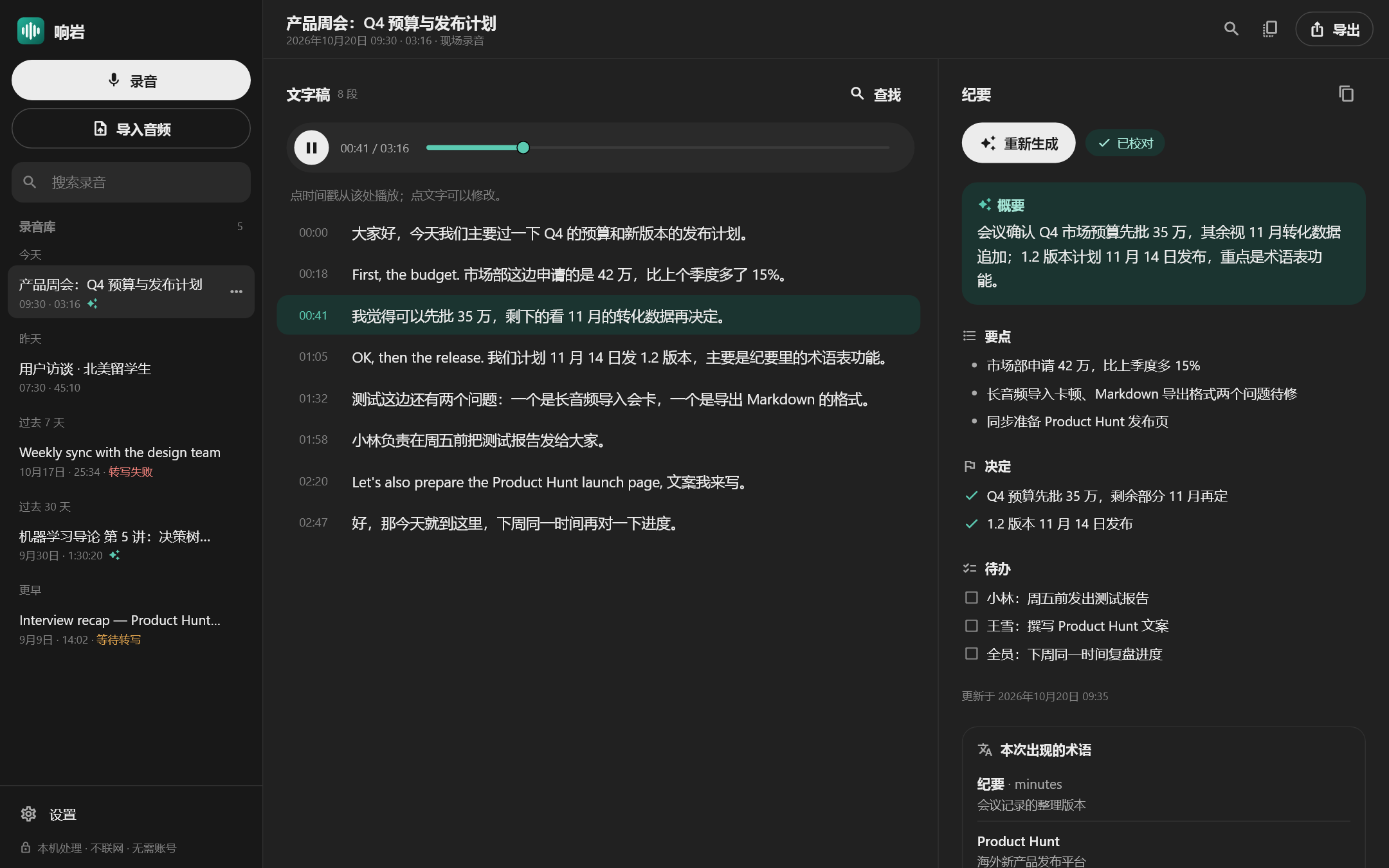
左边录音库,中间带时间戳的文字稿,右边纪要。点时间戳从那里回放,点文字就能改,Ctrl+F 搜遍文字稿和纪要。Library on the left, a timestamped transcript in the middle, notes on the right. Click a timestamp to replay, click a line to edit, and Ctrl+F to search everything.

响岩的主界面:录音库、文字稿、纪要。 Phonolite's main window: library, transcript and notes.

隐私Privacy

全程在你的电脑上It all happens on your PC.

不用账号No account

装好就能用,不注册、不登录。Install and go. No sign-up, no sign-in.

默认不联网Offline by default

录音、文字稿和纪要都存在你的电脑上,导出到哪里由你决定。Recordings, transcripts and notes stay on your PC. You choose where exports go.

不做遥测No telemetry

我们看不到你录了什么、说了什么。We can't see what you record or what was said.

可选:接入你自己的 API。Optional: bring your own API. 智能校对和生成纪要可以改用你自己的 OpenAI 兼容接口(也支持本机的 Ollama、LM Studio)。默认关闭;只发文字稿的文字,不发音频;第一次发往某个地址前会先问你;密钥存在 Windows 的加密存储里。Proofreading and notes can use your own OpenAI-compatible endpoint, including a local Ollama or LM Studio. Off by default; sends transcript text only, never audio; asks before the first request to any new host; keeps your key in Windows' encrypted storage.

规格Specifications

系统System
Windows 10 / 11,64 位。移动版以后推出。Windows 10 or 11, 64-bit. A mobile version is planned.
内存Memory
至少 8 GB;12 GB 及以上自动启用英文专用模型和中文精修;建议 16 GB。8 GB minimum. 12 GB or more automatically enables the English model and Chinese refinement. 16 GB recommended.
处理器与显卡CPU & GPU
64 位 x86 处理器,核心越多越快。显卡可选:支持 Vulkan 的独显或核显会自动使用。64-bit x86 processor; more cores are faster. GPU optional: any Vulkan-capable dedicated or integrated GPU is used automatically.
硬盘Disk
安装后约 5.3 GB(模型随安装包提供)。About 5.3 GB installed (models included).
识别语言Languages
中文、英文,以及一句话里中英混说;每场会议可选自动 / 中文 / 英文。Chinese, English, and both mixed in one sentence. Choose Auto, Chinese or English per meeting.
录音来源Sources
麦克风、电脑声音,或两者一起。Microphone, computer audio, or both.
导入Import
WAV · MP3 · M4A · AAC · FLAC · OGG · OPUS · WMA · MP4 · M4V · MOV · MKV · WebM
导出Export
Markdown、纯文本;一键复制。Markdown or plain text; one-click copy.
界面语言Interface
中文 · English
云端模型Cloud models
可选:校对和纪要可以接入你自己的 OpenAI 兼容接口(也支持本机的 Ollama、LM Studio),默认关闭。Optional: proofreading and notes can use your own OpenAI-compatible endpoint, including a local Ollama or LM Studio. Off by default.
价格Price
免费Free

下载响岩Download Phonolite

安装包还在制作中,做好后会放在这里。The installer is still in the works and will be posted here.

以后推出Later

移动版Mobile

手机上的响岩Phonolite on your phone

  • 在 Windows 版之后推出Coming after the Windows version
  • 同样在本机识别,不上传录音Same on-device recognition, no uploads
以后推出Later

还没有代码签名证书时,Windows 可能提示“已保护你的电脑”:点“更多信息 → 仍要运行”。下载后可以核对 SHA-256:certutil -hashfile 文件名 SHA256。Until the installer is code-signed, Windows may show “Windows protected your PC”: choose “More info → Run anyway”. You can verify the SHA-256 with certutil -hashfile <file> SHA256.

用到的开源模型与组件Open-source models and components

感谢这些项目的作者。完整的许可证随安装包附带,也在 App 的“关于 → 开源许可”里。Thanks to the authors of these projects. Full license texts ship with the app and are listed under About → Open-source licenses.

  • Qwen3.5 4B · Alibaba Qwen · Apache-2.0
  • SenseVoice Small · FunASR / Alibaba · FunASR Model License
  • FireRedASR2-AED · FireRedTeam · Apache-2.0
  • Parakeet Unified EN 0.6B · NVIDIA · NVIDIA Open Model License
  • CT-Transformer 补标点punctuation · FunASR · Apache-2.0
  • DPDFNet 降噪noise reduction · Apache-2.0
  • Silero VAD v5 · Silero · MIT
  • pyannote segmentation 3.0 · MIT
  • 3D-Speaker CAM++ · Alibaba · Apache-2.0
  • CED-Small 声音标注audio tagging · Apache-2.0
  • sherpa-onnx · k2-fsa · Apache-2.0
  • llama.cpp · ggml-org · MIT
  • 术语库来源Term sources · THUOCL (MIT) · CC-CEDICT (CC BY-SA 4.0) · Wikidata (CC0) · pinyin-data (MIT)
  1. 在内部中文测试录音上、开启智能校对且不带术语表时的字错误率(关闭校对为 4.6%);远场、嘈杂、口音较重的录音会更高。Character error rate on our internal Chinese test recordings with proofreading on and no glossary (4.6% with proofreading off). Far-field, noisy or strongly accented audio will be higher.
  2. 开发机(Intel Core Ultra 9 275HX)上 CT-Transformer 补标点的实测。CT-Transformer punctuation measured on our development machine (Intel Core Ultra 9 275HX).
  3. 内部测试录音叠加 10 dB 背景人声,降噪前 49.6%、降噪后 11.4%。Internal test recordings mixed with 10 dB babble noise: 49.6% before noise reduction, 11.4% after.
  4. 音量压到 -30 dB 的测试录音,补音量后字错误率 4.6%(补音量前 5.9%)。Test recordings attenuated to -30 dB: 4.6% error rate with gain boost (5.9% without).
  5. RTX 5070 笔记本显卡上运行 Qwen3.5 4B 的逐句翻译平均时间;只用处理器(8 线程)约 1.5 秒。实际速度取决于设备。Average per-sentence translation time with Qwen3.5 4B on an RTX 5070 laptop GPU; about 1.5 s on CPU alone (8 threads). Actual speed depends on your hardware.